 XenoCI
GitHub Actions 맥 빌드
GitHub보다 2.9배 빨라요
runs-on 한 줄만 바꾸면 돼요
GitHub ActionsXenoCI
No cache5회 가운데 값, 2.9배8분 42초→3분 02초
With cache복원 포함, 10회 가운데 값, 1.9배2분 11초→1분 09초
IceCubesApp 디버그 빌드, Xcode 26.6, 2026-10-24 측정 측정 기록
측정 기록 100배속 재생IceCubesApp, No cache
GitHub Actions8분 42초
XenoCIM4vCPU 57GB3분 02초
Xcode 26.6, 5회 가운데 값2026-10-24 측정
잡 상세예시 화면
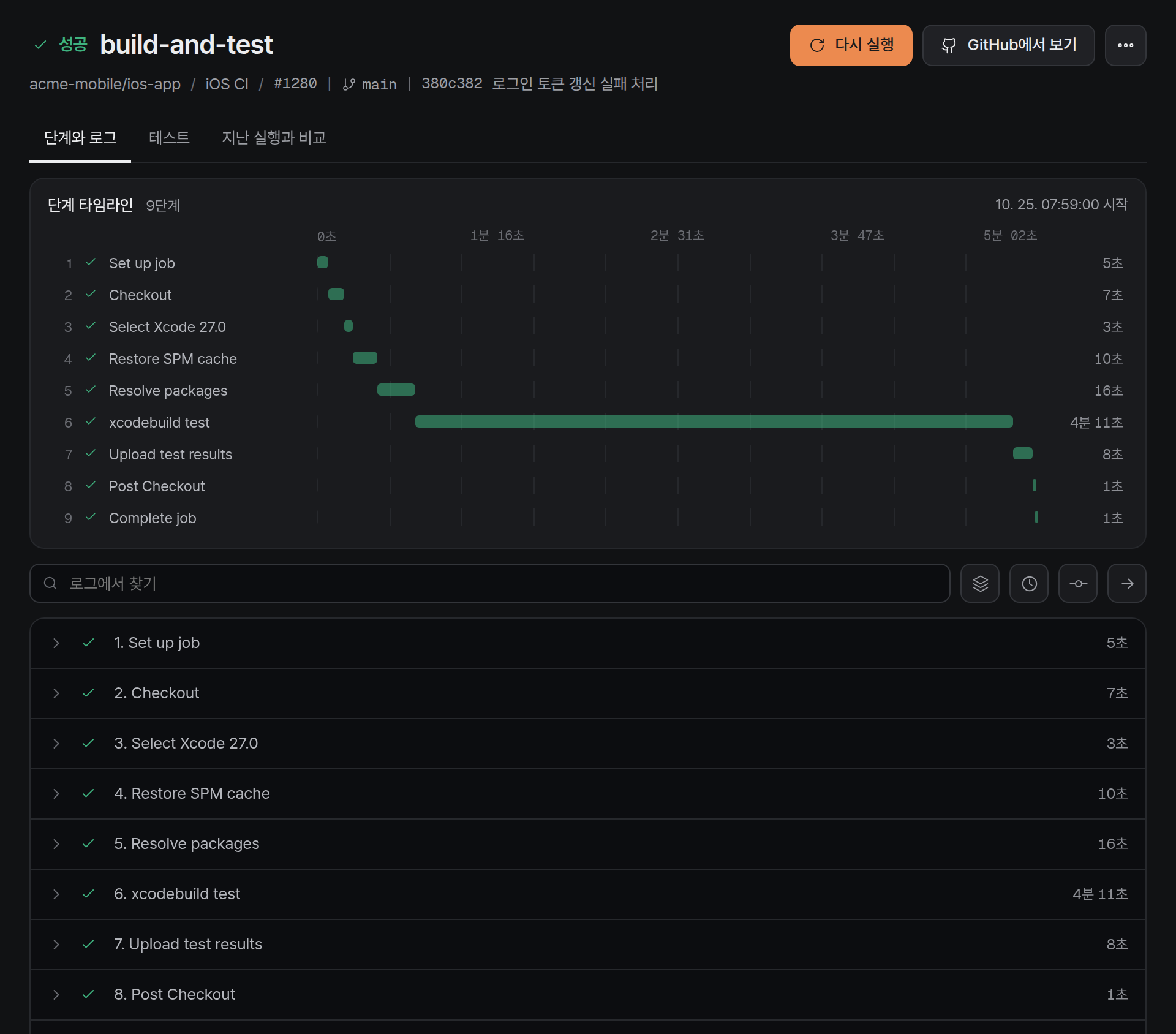
같은 앱, runs-on만 다르게처음부터 빌드해도
처음부터 빌드해도
3분 02초에 끝나요
GitHub Actions는 8분 42초 걸렸어요
With cache 에서는 GitHub Actions 2분 11초, XenoCI 1분 09초예요
- 앱
- IceCubesApp 디버그 빌드
- 도구
- Xcode 26.6
- XenoCI
- Mac mini M4, vCPU 5, 메모리 7GB
- 비교
- GitHub Actions 맥 러너
- 횟수
- No cache 5회, With cache 10회, 가운데 값
- 날짜
- 2026-10-24
빌드 뒤에 보는 화면
빌드, 캐시, 사용량을 콘솔에서 봐요
실패한 줄에서
고칠 파일까지 바로 가요
실패한 단계와 오류 줄을 맨 위에 모아 둬요
- 오류 줄로 바로 가기
- GitHub에서 고칠 파일 열기
실패 원인예시 화면
실패 원인테스트 2개가 실패했어요GitHub에서 고칠 파일 열기오류 줄로 바로 가기
실패한 단계 6. Run tests종료 코드 65로그 26번째 줄, CheckoutTests.swift:42
13✓ Set up job 5초
14✓ Checkout 8초
15✓ Select Xcode 26.6 4초
16✓ Restore SPM cache 12초
17✓ Resolve packages 19초
18✓ Build for testing 3분 51초
19▸ Run tests
20Test Suite 'All tests' started
21Test Suite 'CheckoutTests' started
22Test Case '-[CheckoutTests testCartTotal]' passed (0.012초)
23Test Case '-[CheckoutTests testShipping]' passed (0.008초)
24Test Case '-[CheckoutTests testTaxRounding]' passed (0.010초)
25Test Case '-[CheckoutTests testApplyCoupon]' started
26CheckoutTests.swift:42: error: -[CheckoutTests testApplyCoupon] : XCTAssertEqual failed: ("12900") is not equal to ("12890")
27Test Case '-[CheckoutTests testApplyCoupon]' failed (0.031초)
28Test Case '-[CheckoutTests testCouponExpiry]' failed (0.019초)
29CheckoutTests.swift:58: error: -[CheckoutTests testCouponExpiry] : XCTAssertTrue failed
30Test Suite 'CheckoutTests' failed
31Executed 48 tests, with 2 failures
32** TEST FAILED **
33Process completed with exit code 65
저장소마다 캐시가
아낀 시간을 보여 줘요
스티키 디스크에 둔 폴더를 다음 잡이 이어 써요
1분 53초캐시로 한 잡에서 아낀 시간
25GB저장소마다 무료
넘으면 오래 안 쓴 것부터 자동 정리, 추가 요금은 없어요
스티키 디스크는 GB당 하루 20원이에요
스티키 디스크는 GB당 하루 20원이에요
- 저장소마다 아낀 시간
- 스티키 디스크 상태와 크기
Actions 캐시예시 화면
저장소별 캐시 최근 30일저장소당 상한 25GB
ios-app24.8GB
4시간 12분 아꼈어요상한까지 0.2GB, 추가 요금 없음flutter-shop7.8GB
3시간 05분 아꼈어요무료 범위 안이에요sdk-swift3.9GB
1시간 48분 아꼈어요무료 범위 안이에요30일 동안 아낀 시간9시간 05분
스티키 디스크예시 화면
스티키 디스크 같은 key 로 다음 잡이 이어 써요6개
derived-dataios-app8.42GB5분 전잡이 사용 중
swiftpmios-app2.31GB12분 전사용 가능
cocoapodsios-app1.06GB41분 전사용 가능
pub-cacheflutter-shop3.74GB1시간 24분 전사용 가능
simulator-runtimesios-app2.9GB1일 전사용 가능
derived-dataflutter-shop6.1GB2일 전사용 가능
저장소마다 쓴 시간을
날짜별로 나눠 보여 줘요
막대에 올리면 그날 합계로 바뀌어요
- 날짜별 사용량
- 저장소별 실행 시간
사용량과 결제예시 화면
31시간 51분최근 30일 실행 시간
19시간 06분ios-app
8시간 31분flutter-shop
4시간 14분sdk-swift
ios-appflutter-shopsdk-swift
9월 26일
ios-app 13분
flutter-shop 6분
sdk-swift 2분
ios-app 13분
flutter-shop 6분
sdk-swift 2분
9월 27일
ios-app 18분
flutter-shop 6분
sdk-swift 3분
ios-app 18분
flutter-shop 6분
sdk-swift 3분
9월 28일
ios-app 43분
flutter-shop 18분
sdk-swift 11분
ios-app 43분
flutter-shop 18분
sdk-swift 11분
9월 29일
ios-app 57분
flutter-shop 19분
sdk-swift 13분
ios-app 57분
flutter-shop 19분
sdk-swift 13분
9월 30일
ios-app 48분
flutter-shop 20분
sdk-swift 15분
ios-app 48분
flutter-shop 20분
sdk-swift 15분
10월 1일
ios-app 39분
flutter-shop 21분
sdk-swift 8분
ios-app 39분
flutter-shop 21분
sdk-swift 8분
10월 2일
ios-app 53분
flutter-shop 22분
sdk-swift 10분
ios-app 53분
flutter-shop 22분
sdk-swift 10분
10월 3일
ios-app 15분
flutter-shop 8분
sdk-swift 4분
ios-app 15분
flutter-shop 8분
sdk-swift 4분
10월 4일
ios-app 20분
flutter-shop 8분
sdk-swift 5분
ios-app 20분
flutter-shop 8분
sdk-swift 5분
10월 5일
ios-app 49분
flutter-shop 25분
sdk-swift 7분
ios-app 49분
flutter-shop 25분
sdk-swift 7분
10월 6일
ios-app 40분
flutter-shop 26분
sdk-swift 9분
ios-app 40분
flutter-shop 26분
sdk-swift 9분
10월 7일
ios-app 54분
flutter-shop 27분
sdk-swift 11분
ios-app 54분
flutter-shop 27분
sdk-swift 11분
10월 8일
ios-app 45분
flutter-shop 28분
sdk-swift 13분
ios-app 45분
flutter-shop 28분
sdk-swift 13분
10월 9일
ios-app 59분
flutter-shop 16분
sdk-swift 15분
ios-app 59분
flutter-shop 16분
sdk-swift 15분
10월 10일
ios-app 18분
flutter-shop 6분
sdk-swift 3분
ios-app 18분
flutter-shop 6분
sdk-swift 3분
10월 11일
ios-app 14분
flutter-shop 6분
sdk-swift 4분
ios-app 14분
flutter-shop 6분
sdk-swift 4분
10월 12일
ios-app 55분
flutter-shop 19분
sdk-swift 12분
ios-app 55분
flutter-shop 19분
sdk-swift 12분
10월 13일
ios-app 46분
flutter-shop 20분
sdk-swift 14분
ios-app 46분
flutter-shop 20분
sdk-swift 14분
10월 14일
ios-app 60분
flutter-shop 21분
sdk-swift 7분
ios-app 60분
flutter-shop 21분
sdk-swift 7분
10월 15일
ios-app 51분
flutter-shop 22분
sdk-swift 9분
ios-app 51분
flutter-shop 22분
sdk-swift 9분
10월 16일
ios-app 42분
flutter-shop 23분
sdk-swift 11분
ios-app 42분
flutter-shop 23분
sdk-swift 11분
10월 17일
ios-app 20분
flutter-shop 8분
sdk-swift 5분
ios-app 20분
flutter-shop 8분
sdk-swift 5분
10월 18일
ios-app 16분
flutter-shop 9분
sdk-swift 5분
ios-app 16분
flutter-shop 9분
sdk-swift 5분
10월 19일
ios-app 38분
flutter-shop 26분
sdk-swift 8분
ios-app 38분
flutter-shop 26분
sdk-swift 8분
10월 20일
ios-app 52분
flutter-shop 27분
sdk-swift 10분
ios-app 52분
flutter-shop 27분
sdk-swift 10분
10월 21일
ios-app 43분
flutter-shop 28분
sdk-swift 12분
ios-app 43분
flutter-shop 28분
sdk-swift 12분
10월 22일
ios-app 57분
flutter-shop 16분
sdk-swift 14분
ios-app 57분
flutter-shop 16분
sdk-swift 14분
10월 23일
ios-app 48분
flutter-shop 17분
sdk-swift 7분
ios-app 48분
flutter-shop 17분
sdk-swift 7분
10월 24일
ios-app 14분
flutter-shop 6분
sdk-swift 3분
ios-app 14분
flutter-shop 6분
sdk-swift 3분
10월 25일
ios-app 19분
flutter-shop 7분
sdk-swift 4분
ios-app 19분
flutter-shop 7분
sdk-swift 4분
9월 26일10월 6일10월 16일10월 25일
얼리빌드
빌드는 AI 에이전트에게 맡기고 다른 일 하세요
AI 에이전트가 MCP 로 부르는 맥 빌드, 곧 제공해요
13번 → 1번10분 빌드에서 모델 호출
약 18분의 1모델이 읽는 결과
Claude Code 대화형, 10분 빌드 시험 기준
Claude CodeMCP Tasks 이전빌드 0분 00초
Claude CodeMCP Tasks빌드 0분 00초
요금
쓴 분만큼만 내요
잡이 시작한 분마다 차감해요
Mac mini M4 또는 M6
xenoci-standardM4vCPU 5, 메모리 7GB
M6vCPU 6, 메모리 7GB준비 중
50원분당
- 매월 무료 1,000분(5,000원), 맥은 1분에 10분
- 시작한 분마다 차감
- 10분 빌드 500원
GitHub 호스티드 macOS는 분당 0.062달러예요 GitHub 요금표
jobs:
build:
runs-on: xenoci-standard
steps:
- uses: actions/checkout@v4
- run: xcodebuild build
다음 잡부터 Mac mini M4에서 빌드해요